
How to Set a Cancellation Policy That Protects Your Business Without Pushing Clients Away
Timeli.sh team|June 2, 2026|11 min read|No comments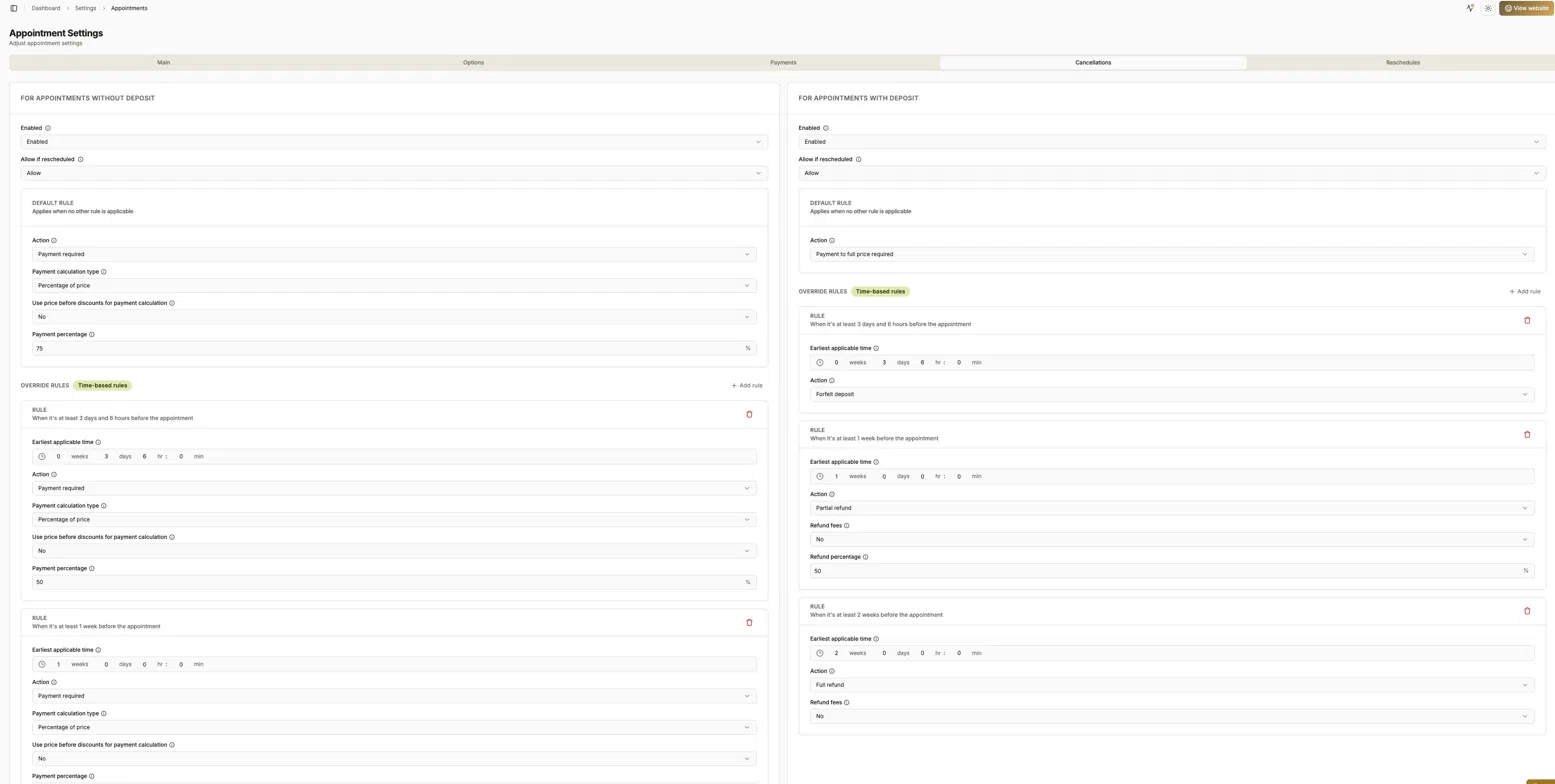
Every salon owner, tattoo artist, personal trainer, and service provider has a version of the same story. A client cancels two hours before their appointment. You have no time to fill the slot. That hour is just gone.
It happens once, and you shrug it off. It starts happening regularly, and you realize you need a policy.
The challenge is that most service business owners are people-pleasers by nature. You want clients to like you. A cancellation policy can feel confrontational, like you are assuming bad intentions before a client has done anything wrong.
But here is the reframe: a clear, fair cancellation policy is not a punishment. It is a professional standard that protects your time, sets expectations upfront, and actually builds trust with clients who respect how seriously you take your work. The clients worth keeping will respect you more for having one.
This guide walks through how to think about cancellation and reschedule policies, what to include, and how to configure everything in Timeli.sh so the system enforces your rules automatically without any awkward conversations.
Why "No Policy" Is Also a Policy
If you have never written down a cancellation policy, you already have one. It just says: "Cancel whenever, no consequences." And clients, consciously or not, pick up on that.
A vague or nonexistent policy puts you in an impossible position every time a late cancellation happens. You either let it go (and eat the loss), or you try to enforce something informal (and risk an awkward confrontation). Neither option feels good.
A written policy solves this before it starts. The client agreed to it when they booked. If they cancel last-minute, you are not springing a surprise on them. You are following through on something they already acknowledged. That changes the entire dynamic.
The Two Things a Good Policy Covers
1. Cancellations
A cancellation policy answers one core question: if a client cancels, what happens?
The answer usually depends on when they cancel. Canceling three weeks out is very different from canceling three hours out. A time-based policy reflects that reality and feels fair to clients because it mirrors how the world generally works.
Common structures for appointments with a deposit:
Full refund if the client cancels more than 48 to 72 hours before the appointment
Partial refund (or forfeit of deposit) if they cancel within 24 to 48 hours
No refund if they cancel within a few hours of the appointment, or do not show up at all
For appointments without deposits, you can ask for additional payments:
No payment if the client cancels more than 48 to 72 hours before the appointment
50% payment if they cancel within 24 to 48 hours
Full payment if they cancel within a few hours of the appointment
The right thresholds depend on your business. A service that takes 30 minutes can often be filled last-minute. A service that takes three hours with prep work cannot. Build your windows around the realistic lead time you need to rebook the slot.
2. Reschedules
A reschedule policy is separate from a cancellation policy, and the distinction matters.
Rescheduling is generally a better outcome for everyone. The client still wants to come in, and you still get the revenue. Most businesses want to make rescheduling easy, within reason.
A reschedule policy answers: can a client reschedule, and if so, how close to the appointment can they do it? Some businesses allow unlimited rescheduling with enough notice. Others treat a last-minute reschedule the same as a cancellation if it cannot be filled. You get to decide where that line is.
Deposits Change the Equation
If you collect deposits at the time of booking (which, as we covered in our payments post, is one of the most effective ways to reduce no-shows), your cancellation policy needs to address what happens to that deposit.
The main options are:
Full refund of the deposit if the client cancels with enough notice
Partial refund if they cancel within a shorter window
Forfeit the deposit if they cancel too close to the appointment
The deposit is the enforcement mechanism. Without it, a cancellation policy is mostly a polite request. With it, there is something tangible at stake, which is why deposit-based policies are so effective at reducing last-minute cancellations compared to policies that rely on chasing a payment after the fact.
Timeli.sh lets you set separate policies for appointments with deposits and appointments without deposits, because the right response in each case is different. More on how to configure that below.
Setting Up Time-Based Rules
The most effective cancellation policies are not one-size-fits-all. They have graduated rules that reflect the actual impact of a cancellation at different points in time.
Here is an example of how a salon might structure this for appointments with a deposit:
Cancellation timing | What happens to deposit |
|---|---|
More than 2 weeks before | Full refund |
1 week to 2 weeks before | 50% refund |
Less than 3 days and 6 hours before | Deposit forfeited |
And for appointments without a deposit:
Cancellation timing | What happens |
|---|---|
More than 1 week before | No charge |
3 days to 1 week before | 50% of service price required |
Less than 3 days and 6 hours before | Full payment required |
This kind of tiered structure is easy for clients to understand and hard to argue with. The closer the cancellation, the more you keep, because the harder it is for you to recover the time.
Timeli.sh lets you build exactly this structure using time-based override rules. You set a default rule for what happens in all cases, then add override rules for specific time windows that take priority. The system applies the right rule automatically based on when the cancellation happens.
Per-Service Policies
Not every service you offer carries the same risk from a cancellation.
A 20-minute express treatment that can be filled on short notice is very different from a four-hour color and style appointment that requires product prep and blocks a significant chunk of your day. Applying the same cancellation policy to both does not make sense.
Timeli.sh lets you set cancellation and reschedule policies at the individual service level, not just globally. So your quick services can have a more relaxed policy while your longer, higher-value services have stricter protections. You set it once per service and the system handles the rest.
Cancellations after reschedule
Sometimes your customer can be sneaky and first reschedule their appointment for a later date and then cancel it in order to avoid paying the cancellation fee or forfeiting the deposit. To prevent this Timeli.sh gives you the ability to disallow cancellations after the appointment was rescheduled. Another thing is customers who keep rescheduling the same appointment over and over again. For this, you can configure how many times a single appointment can be rescheduled.
What to Do About Repeat Offenders
Every business eventually encounters a client who cancels regularly at the last minute. They book, they cancel within hours of the appointment, they rebook, they cancel again. Sometimes there are legitimate reasons. Often there is just a pattern.
Your cancellation policy handles individual incidents. But for clients who have made a habit of it, Timeli.sh gives you another tool: you can block a client from making future bookings entirely.
This is not a decision to make lightly, and it is worth having a brief conversation with the client before using it. But for genuine repeat offenders who are costing you consistent revenue and blocking other clients from those slots, blocking is a clean, professional solution that does not require an ongoing back-and-forth.
The blocked client simply cannot complete a new booking through your page. No confrontation, no lengthy explanation. The behavior had consequences.
How to Set Up Your Policies in Timeli.sh
There are two ways to access and configure your cancellation and reschedule policies.
For your global default policy (applies to all appointments unless overridden at the service level):
Go to Settings in your Timeli.sh dashboard, then Appointments, then open the Cancellations or Reschedules tab. This is where you set the rules that apply across your business by default.
For a per-service policy (overrides the global policy for a specific service):
Go to Services, select the service you want to configure, and open the Cancellations or Reschedules tab within that service's settings. Any rules you set here will apply specifically to bookings for that service and take priority over your global settings.
Within either location, you will find separate sections for appointments with deposits and appointments without deposits. Each section has a default rule and the option to add time-based override rules. You can set the action (full refund, partial refund, forfeit deposit, payment required), the refund percentage, and the time window each rule applies to.
Once saved, all of this runs automatically. When a client cancels through their booking confirmation link, Timeli.sh checks which rule applies based on the timing and processes the outcome without any action needed from you.
What to Communicate to Clients
Setting up the policy in Timeli.sh is only half of it. Clients need to actually know the policy exists before they book, not find out about it when they cancel.
A few places to make your policy visible:
On your booking page. A short, plain-language summary of your cancellation terms should be visible before a client confirms their appointment. Something like: "Cancellations more than 48 hours in advance receive a full refund. Cancellations within 48 hours forfeit the deposit." Clear, simple, no surprises.
On your booking form. You can add a simple required checkbox field to your booking forms that forces customers to accept your policies. For example, “Agree to policies.”

Separate Policies page. A simple text page where you describe those policies in full and have the link clearly presented on your website.
In your booking confirmation. The confirmation message clients receive after booking is the right place to restate the policy. They are engaged, they just made a decision, and they are reading the confirmation carefully.
In your SMS reminders. A reminder sent 48 hours before the appointment is also a natural moment to mention the cancellation window. Something like: "Your appointment is tomorrow at 2pm. If you need to cancel or reschedule, please do so before 2pm today to avoid a cancellation fee." This is both a helpful reminder and a soft enforcement of your policy.
Sample Policy Language You Can Use
Here is a simple, professional cancellation policy you can adapt for your business:
Appointments may be cancelled or rescheduled up to [X hours/days] before your scheduled time for a full refund of your deposit. Cancellations made within [X hours/days] of your appointment will result in [partial refund/forfeiture of deposit]. Same-day cancellations and no-shows are non-refundable.
We understand that things come up. If you need to make a change, please reach out as early as possible, and we will do our best to accommodate you.
The second paragraph matters. It acknowledges that you are a human business, not a rigid machine. Clients who have a genuine emergency and reach out early almost always find that a reasonable business will work with them. The policy protects you from the people who do not bother to reach out at all.
The Bottom Line
A cancellation policy is not about being difficult. It is about running a sustainable business where your time has real value, and your schedule is treated with respect.
The right policy is clear enough that clients understand it before they book, fair enough that clients who cancel with reasonable notice are not penalized, and firm enough that last-minute cancellations have real consequences.
Timeli.sh handles the enforcement automatically, so you never have to have an uncomfortable conversation about it. You set the rules once, and the system applies them consistently every time.
Log into Timeli.sh to set up your cancellation policy, or start a free trial if you are not on the platform yet.
Questions about how to structure your cancellation policy for your specific business? Reach out to our support team.
No comments yet. Be the first to comment.
Add comment
 The all-in-one appointment scheduling platform for modern businesses.