
How to Reduce No-Shows by 40% with Automated SMS Reminders
Timeli.sh team|May 29, 2026|10 min read|No comments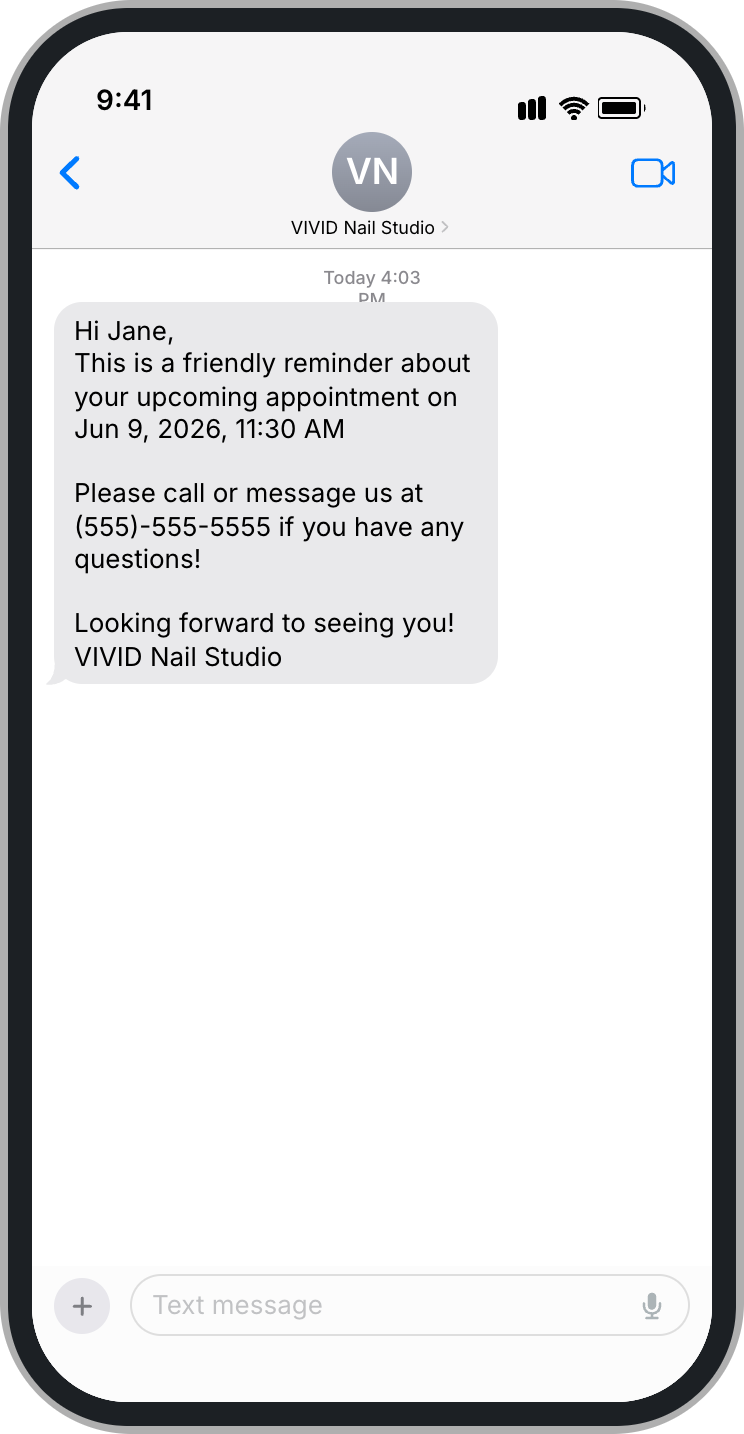
You blocked off two hours for a client. You turned away another booking to hold that slot. You prepped, showed up, and waited.
They never came.
No-shows are one of the most frustrating and expensive problems in any service business. A missed appointment is not just lost revenue for that hour. It is the opportunity cost of every other client you could have booked instead.
The good news is that most no-shows are not intentional. Clients are not blowing you off. They forgot. Life got busy, the appointment slipped their mind, and they never thought to cancel. That means the fix is simpler than you might think: remind them.
Specifically, remind them by text.
Why No-Shows Happen (And Why It Is Not Personal)
Before getting into the solution, it helps to understand the problem.
When a client books an appointment two or three weeks in advance, that booking lives in their mental to-do list for a moment and then fades. They meant to add it to their calendar. They probably did not. By the time the day arrives, they have no memory of it at all.
This is not about commitment or respect. It is just how human memory works. People book things with the best intentions and then get swept up in their actual lives.
Phone call reminders used to be the standard fix. But most people do not answer calls from numbers they do not recognize. Voicemails go unheard for days. Email reminders get buried under newsletters and promotions.
Text messages are different.
Why SMS Works Better Than Email or Phone Calls
The numbers here are hard to argue with.
SMS messages have an open rate of around 98%. Email open rates for small businesses typically land between 20% and 40% on a good day. Most text messages are read within three minutes of being received.
More importantly, a text message feels personal. It lands in the same place as messages from friends and family. It does not require opening an app, logging into anything, or sorting through a cluttered inbox.
For appointment reminders specifically, SMS has one other major advantage: it is actionable on the spot. A client reads "Your appointment is tomorrow at 2pm" and they can handle it in ten seconds, right then, without going anywhere else.
That immediacy is what makes SMS reminders so effective at reducing no-shows. They meet clients exactly where they are, at the moment they are most likely to act.
What the Research Actually Shows
Studies on appointment reminder effectiveness consistently show that SMS reminders reduce no-show rates by 30% to 40% compared to businesses that send no reminders at all.
In healthcare settings, where no-show rates can run as high as 30%, clinics that implemented automated SMS reminders saw attendance rates climb significantly within the first month.
Service businesses outside of healthcare see similar results. Salons, personal trainers, tattoo studios, and coaches who switch from manual reminder calls to automated SMS consistently report fewer gaps in their schedule and more predictable revenue.
The effect compounds over time, too. Clients who receive reminders are not just more likely to show up for that appointment. They are more likely to rebook because the experience of working with you feels organized and professional.
How Automated SMS Reminders Work
You do not need to manually text every client before every appointment. That would defeat the purpose. Automated reminders handle this for you in the background.
Here is how the process works on a platform like Timeli.sh.
1. Client books an appointment
The moment a client confirms a booking, the system logs the date, time, and their phone number.
2. Reminders are scheduled automatically
Based on the rules you set, the system queues up reminders. A common setup is one reminder 48 hours before the appointment and another 2 hours before.
3. Texts go out without any action from you
At the scheduled time, the message is sent automatically. You do not have to think about it, log in, or do anything.
What to Include in a Good Reminder Message
The content of your reminder matters almost as much as the timing. A vague message is easy to ignore. A clear, specific message is hard to miss.
A good appointment reminder includes:
The client's name
The date and time of the appointment
The name of the service or staff member they booked with
Your business name
Here is an example of a reminder that works well:
"Hi Sarah, this is a reminder that your 60-minute massage at Bloom Wellness is scheduled for tomorrow, Thursday May 30th at 2:00 PM with Jamie. See you tomorrow!"
Notice what this message does. It is specific. It tells Sarah exactly what is happening and exactly what to do. It does not require her to remember anything or go digging for information. Everything she needs is right there.
Timing: When to Send Reminders
The timing of your reminders makes a big difference in how effective they are.
48 hours before the appointment
This is the most important reminder. It gives clients enough time to reschedule if something has come up, without leaving you with an empty slot too close to the appointment to fill. Most cancellations triggered by a 48-hour reminder still leave you time to rebook.
2 to 4 hours before the appointment
A same-day reminder serves a different purpose. It is not really about cancellations at this point. It is a nudge that says "this is happening today, do not forget." Clients who might have let the appointment slip their mind get one last prompt right when it matters.
At the time of booking
A confirmation message sent immediately after booking is not technically a reminder, but it is just as important. It gives clients something concrete to refer back to and sets the expectation that you will be in touch before the appointment. It also catches typos in phone numbers before it is too late.
How SMS Credits Work on Timeli.sh
On Timeli.sh, SMS reminders are powered by a simple credit system. Each text message uses a small number of credits, and credits are included with your subscription every month.
For most businesses, the included credits are more than enough to cover reminders for all their appointments. If you run a high-volume operation or want to send more messages per appointment, additional credits are available to purchase in bundles at any time.
This model keeps costs predictable. You are not paying a monthly SMS fee that scales unexpectedly. You get a base of included messages and the flexibility to add more if you need them.
The setup takes about two minutes. Connect your account, write your reminder message (or use one of the pre-written templates), set your timing, and the system handles everything from there.
Why Timeli.sh Uses an SMS Credit System
We want to be upfront about how this works, because we think you deserve to understand what you are paying for.
SMS is genuinely more expensive to deliver than email. When we send an email reminder on your behalf, the cost is negligible. SMS is a different story. Every text message we send incurs a cost from our messaging provider and an additional charge from the recipient's carrier. Those costs add up fast at scale.
There is one more wrinkle worth knowing: SMS messages have a character limit of 160 characters per segment. If your reminder message runs longer than that, it gets split into multiple segments by the carrier, and each segment is billed as a separate message. A 170-character text is two messages. The same applies to replies from your clients.
Rather than baking those costs into a higher base subscription price for everyone, we chose a different approach. Every Timeli.sh plan includes a monthly allocation of SMS credits that covers the needs of the average service business. If you run a higher volume operation, you can purchase additional credits in bundles as needed.
We think this is the fairer model. Businesses that send fewer messages are not subsidizing businesses that send hundreds. You get transparency into what you are using, and you only pay more if you actually need more.
Beyond Reminders: Other Ways to Reduce No-Shows
SMS reminders are the single most effective tool for reducing no-shows, but they work even better alongside a few other practices.
Require a deposit at booking. When clients have money on the line, they show up. Even a small deposit of ten or fifteen dollars dramatically reduces the no-show rate because canceling means losing something they already paid. Timeli.sh supports deposit collection through Stripe and Square at the time of booking.
Make rescheduling easy. Some no-shows happen because clients feel too embarrassed or too busy to cancel. If canceling or rescheduling requires a phone call, many people will just not show up instead. A self-service reschedule link in your reminder message removes that friction entirely.
Have a clear cancellation policy. Put your policy in your booking confirmation and your reminder messages. When clients know there is a 24-hour cancellation window, they are more likely to give you notice. Most people want to do the right thing. They just need to know what the right thing is.
Follow up after a no-show. A brief, non-accusatory message to a client who missed an appointment often leads to a rebook. Something like "We missed you today. Would you like to reschedule?" costs nothing and occasionally turns a frustrating situation into a loyal client who appreciates the grace.
The Real Cost of Not Sending Reminders
It is easy to look at SMS reminders as a nice-to-have. But consider what a single no-show actually costs your business.
Take a service that generates 80 dollars per appointment. If you have a 15% no-show rate and see 20 clients a week, you are losing three appointments a week on average. That is 240 dollars a week, or more than 12,000 dollars a year, in revenue that simply evaporates.
A 40% reduction in your no-show rate would recover roughly 5,000 dollars of that annually, from a tool that costs a fraction of that and runs entirely on autopilot.
The math is not complicated. Automated SMS reminders are one of the few investments in your business where the return is almost immediate and almost guaranteed.
Getting Started
If you are already on Timeli.sh, SMS reminders are built into your account. Head to your notification settings, write your reminder message, set your timing, and you are done.
If you are not on Timeli.sh yet, start a free trial and have your first automated reminder set up before the end of the day.
Your clients want to show up. Give them every reason to.
Start your free trial at Timeli.sh
Running into questions about setting up SMS reminders for your business? Feel free to get in touch with our support team.
No comments yet. Be the first to comment.
Add comment
 The all-in-one appointment scheduling platform for modern businesses.