
How to Get More Bookings from Your Google Business Profile
Timeli.sh team|June 3, 2026|11 min read|No comments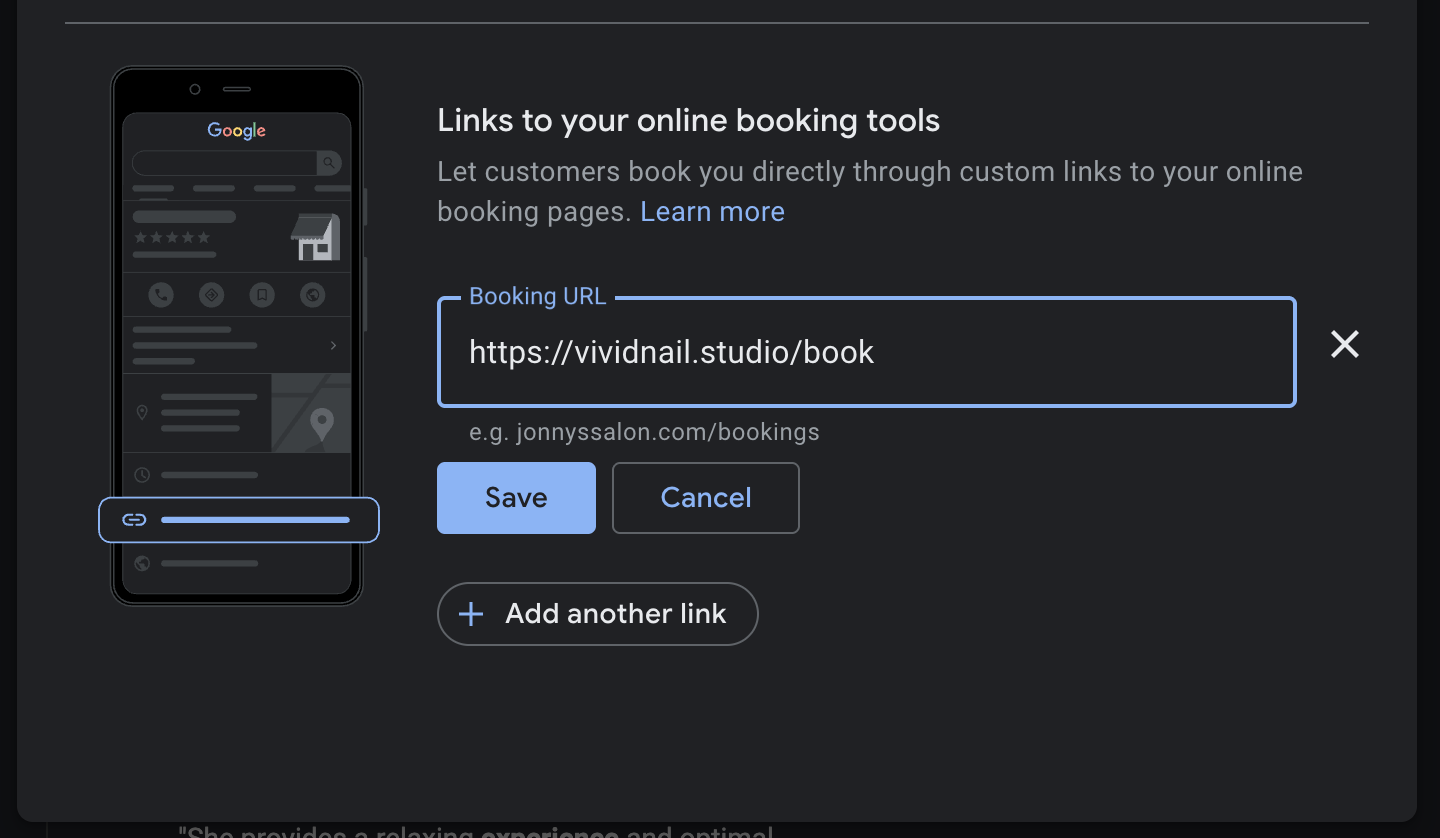
When someone in your area searches "hair salon near me" or "massage spa open Saturday," Google shows them a list of local businesses before it shows them any websites. That list is called the Local Pack, and it is some of the most valuable real estate on the internet for a service business.
Your Google Business Profile is what gets you on that list. And most service businesses are leaving a significant amount of business on the table by treating it as a basic directory listing rather than an active booking channel.
This guide walks through every step to turn your Google Business Profile from a passive listing into something that actively drives new client bookings, without spending anything on advertising.
Why Your Google Business Profile Matters More Than Your Website for Local Clients
Most of the clients you want, the ones who are in your city, ready to book, actively searching for what you offer, are not starting their search on your website. They are starting it on Google.
When someone finds your business on Google Search or Google Maps, they can schedule an appointment with you even without navigating to your website. That means a client can go from discovering you to booking an appointment in under a minute, entirely within Google.
Research has found that over a 90-day period, an appointment link on a Google Business Profile drove about 20% of all clicks on a business listing. One in five people who clicked on a listing went straight to the booking link.
If your profile is incomplete or missing a booking link, those clients are clicking on a competitor who has one.
Step 1: Fill Out Every Section of Your Profile
This sounds obvious but most business profiles are missing something. Google uses the completeness and accuracy of your profile as a ranking signal. A half-filled profile ranks lower than a complete one, and it converts worse even when it does rank.
Go through each of the following and make sure they are accurate and up to date.
Business name. Use your real business name exactly as it appears on your signage. Do not stuff keywords into it (e.g., "Bloom Salon - Best Hair Salon in Austin"). Google penalizes this.
Category. Your primary category is one of the most important ranking factors. Be specific. "Hair salon" ranks better for hair salon searches than "beauty salon" does. If you offer multiple services, add secondary categories for each.
Address and phone number. Make sure these match exactly what is on your website, your booking page, and any other directories your business appears in. Inconsistency across platforms confuses Google and hurts your ranking.
Hours. Keep these current. Update them for holidays. A client who shows up because Google said you were open and finds you closed is a lost client and often a bad review.
Website. Link directly to your booking page rather than your homepage if possible. The fewer clicks between a profile visitor and a confirmed booking, the better.
Business description. Write two to three sentences describing what you do, who you serve, and what makes you worth choosing. Use natural language and include the services you want to be found for. Do not keyword stuff. Write it like a human talking to another human.
Services. In 2026, Google Maps AI summaries pull directly from service entries when a user asks about what's available nearby. For a salon, listing individual service menu items means each entry acts as a mini landing page inside the profile. Add every service you offer with a short description and price range where possible.
Attributes. Google regularly adds new attribute fields depending on your category. Check your profile for anything you have not filled in. Common ones for salons and spas include wheelchair accessibility, parking availability, whether you accept walk-ins, and which payment methods you take.
Step 2: Add a Booking Link
This is the single highest-impact change most service businesses can make to their Google Business Profile, and most of them have not done it.
An appointment link is a direct URL that connects your business listing to your scheduling system. When clients find your business through Google Search or Maps, they can click this link to book an appointment without navigating to your website. The link appears prominently on your profile, making it immediately visible to anyone viewing your listing.
Here is how to add it:
Go to Google Search and search for your business name while logged into the Google account that manages your profile
In the management panel that appears, click Bookings
Select Add Link
Paste your Timeli.sh booking page URL (for example,
https://mysalon.timeli.sh/book)Save
If you are on mobile, open Google Maps, and do the same steps.
After adding your URL, Google will typically review the link. This process usually takes 24 to 48 hours, though it can sometimes happen immediately.
Your Timeli.sh booking page URL is the right link to use here. It is your branded booking page on your own domain, which keeps the experience consistent from the moment a client clicks through.
Step 3: Get More Reviews (And Respond to All of Them)
Reviews are one of the most powerful ranking and conversion signals on Google Business Profile. Profiles with 50 or more reviews get three times more clicks than those with under 10. In 2026, both the recency of reviews and your response rate matter equally alongside the total count.
Getting reviews is simpler than most business owners make it. The key is asking at the right moment: right after a great appointment when the client is still in your space and feeling good about the experience.
A few approaches that work:
Ask in person. After a service, simply say: "If you enjoyed your visit today, a Google review would mean the world to us. I can text you a link right now if that makes it easier." Most happy clients will say yes on the spot.
Include a review link in your post-appointment email. Timeli.sh can send automated follow-up messages after appointments. Adding a Google review link to that message catches clients while the experience is fresh.
Put a QR code at your checkout counter. A small card or sign that says "Loved your visit? Leave us a review" with a scannable QR code makes it effortless for clients who want to help but forget by the time they get home.
Respond to every review, positive and negative. Responding to reviews signals to Google that you are an active, engaged business. It also signals to potential clients that you care. For negative reviews, respond calmly and professionally. A gracious response to a critical review often impresses potential clients more than the review itself worried them.
Step 4: Add High-Quality Photos
Businesses with photos on their Google Business Profile receive 42% more requests for directions and 35% more click-throughs to their websites compared to those without photos. For salons and spas specifically, where the visual result of your work is the whole point, photos are not optional.
In 2026, Google uses AI to analyze photo quality and relevance. Blurry, dark, or stock images receive lower visibility in search results. This means the quality of your photos now directly affects where you rank, not just how you look once someone finds you.
What to photograph:
Your work. Before and after shots, finished styles, completed treatments. This is the content that converts browsers into clients.
Your space. The reception area, styling stations, waiting area. Clients are deciding whether your space feels comfortable and professional before they walk in.
Your team. Faces build trust faster than anything else. A photo of your stylists at work makes the business feel human.
Your exterior. A photo of your storefront helps clients find you and confirms they are in the right place.
Upload new photos regularly. Google favors active profiles over static ones, and fresh photos signal that your business is open and thriving.
A few practical notes: shoot in good natural light if possible, use a recent smartphone if you do not have a camera, and avoid heavy filters. Photos should be well-lit and not overly filtered. AI-generated images are worth avoiding as they can create unrealistic expectations for your clients.
Step 5: Use Google Posts
Most business owners do not know that Google Business Profile has a built-in posting feature. You can publish short updates, promotions, and announcements that appear directly on your listing.
In 2026, Google Posts feed directly into the Maps AI place summary in addition to reviews and your profile description. That means a post about a seasonal promotion or a new service can now surface in AI-generated answers when potential clients are searching nearby.
Ideas for posts that work well for salons and service businesses:
A new service you have added to your menu
A seasonal promotion (summer ready, back to school, holiday packages)
A reminder about your online booking link ("Book your appointment for next week before slots fill up")
An introduction to a new team member
A before and after featuring a recent client (with their permission)
Posts do not need to be long. Two or three sentences and a good photo is enough. Aim to post at least twice a month to keep your profile active.
Step 6: Fill In the Q&A Section
Your Google Business Profile has a questions and answers section where anyone can submit a question about your business. You may not have noticed it, or may have forgotten it exists, but it is worth paying attention to for two reasons.
First, if you do not answer questions, anyone can, and they may answer incorrectly. Second, using the Q&A section to address common client questions, with relevant keywords included naturally, helps your profile climb higher in local rankings.
You can also add your own questions and answer them yourself. Think about what potential clients most often ask before their first visit: do you take walk-ins, what is your cancellation policy, do you require a deposit, how early should they arrive, where do they park. Answer these proactively and you eliminate friction before a new client even has to ask.
Step 7: Keep Your Profile Active
Google rewards businesses that treat their profile as a living thing rather than a one-time setup. Beyond posting regularly, a few habits make a meaningful difference:
Update your hours for holidays and closures. Nothing damages trust faster than a client arriving to find you closed because your Google hours were wrong.
Check for and respond to new reviews weekly. Recency of responses is a factor. A profile that last responded to a review eight months ago looks less active than one that responds promptly.
Revisit your services and description seasonally. Add new services as you introduce them. Update your description if your focus has shifted. Keep everything current.
Check for new attribute fields. Google adds new fields regularly. Returning to your profile every couple of months to look for anything new ensures you are not missing a feature that your competitors have already filled in.
Putting It All Together
Your Google Business Profile is often the first impression a potential client gets of your business. Before they see your website, before they see your social media, before they walk through your door, they see your Google listing.
A complete, active, well-photographed profile with a working booking link can be the difference between a potential client choosing you or choosing the next business on the list.
The changes in this guide are not complicated. Most of them take less than an hour to implement. But most of your local competitors have not done them, which means the opportunity is real.
Start with the booking link if you have not added one yet. Point it at your Timeli.sh page. Then work through the rest of the list over the next couple of weeks. You will start seeing the difference in your booking volume within a month.
Set up your Timeli.sh booking page and add it to your Google Business Profile today.
Have questions about connecting your booking page to Google or optimizing your profile for your specific type of business? Leave a comment below or reach out to our support team.
No comments yet. Be the first to comment.
Add comment
 The all-in-one appointment scheduling platform for modern businesses.